The main InqScribe window integrates resizeable video display, a transcription (or annotation) field, and a complete set of media controls. Here are some key features:
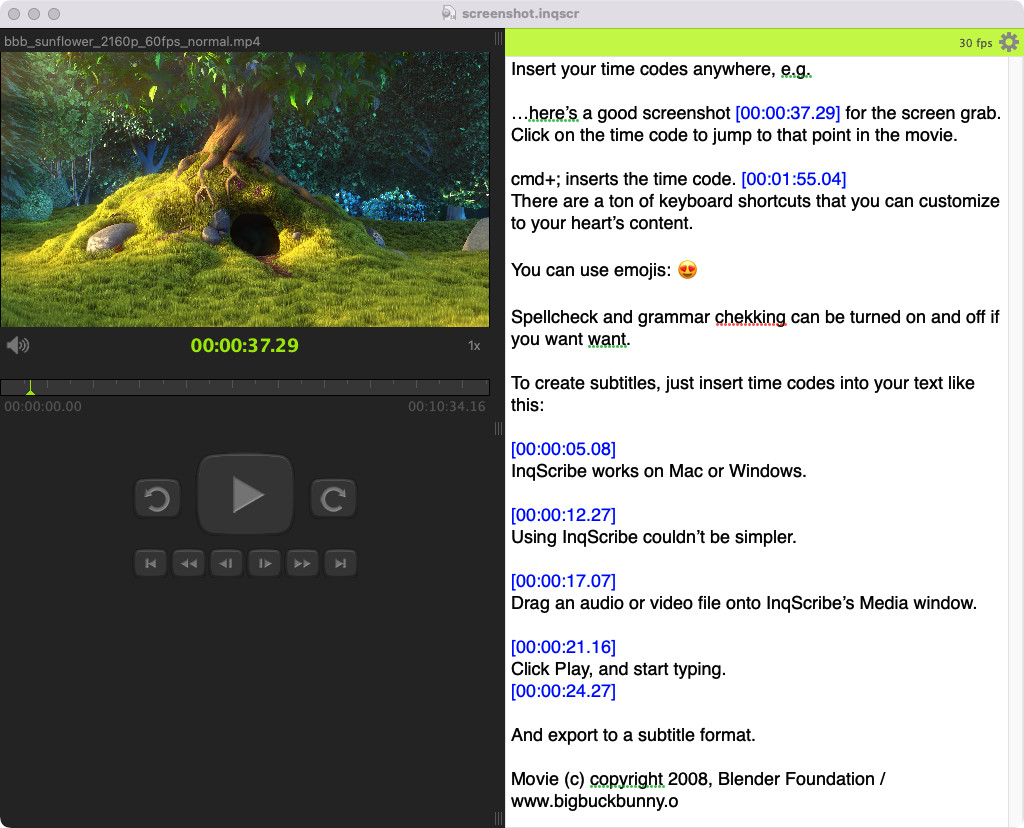 InqScribe in macOS (show Windows)
Each InqScribe document links your text and timecodes with a a media object—usually a digital video or audio file. InqScribe supports most major digital media formats, including MP4, MP3, QuickTime (MOV), WMV (Windows only), AVI, MPEG, and more.
Timecodes can be inserted into the transcript with a keystroke. Timecodes are dynamic and act as temporal bookmarks; you may click on them to instantly jump to that time in the video.
InqScribe provides an open, flexible editing space. Structure your transcript and notes in whatever way is most comfortable for you.
The size of the video is flexible. Decrease it to increase room for your transcript. Increase it for presentations. You can even turn the video off and just listen to the audio.
The interactive timeline, located just below the video display, displays the current playback time in green. The user can set the current playback time by mousing over this control; a blue cursor will appear that tracks the mouse location and shows the exact time that InqScribe will jump to once the user clicks the mouse.
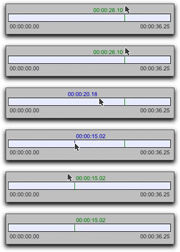
The timeline also displays the start and end times of the video. Note that you may adjust the start time to any value you want; all other times are automatically adjusted by this amount. This is useful if you want your transcript timecodes to sync with timecodes that are burned onto your footage.
The remote control buttons provide sophisticated control over video playback. You may attach customized key combinations to any of these controls.
You can also attach key combinations to customized variants of these controls. A common, and powerful, transcription command is the Skipback key (mapped to control-tab by default, although you can change this). This key automatically skips back a few seconds and resumes media playback -- a handy way to listen to a segment again and again.
The speed of playback is adjustable. Slow it down to improve transcription accuracy. Speed it up to save time reviewing footage.
We use anonymized Google Analytics cookies to help us understand how people use this web site so that we can improve it for future visitors. You may opt-out of tracking by Google Analytics cookies at any time.